Plan features explained

What each feature does, and what you'd miss without it.

Every plan runs the full survey and shows what to fix first. These features add connected data, your brand, written comments, deeper history, a plan for action, and ways to take results into your own tools.

HR and CRM connectors

Your survey list stays up to date on its own.

Included in Pro, Business, and Enterprise · $99/month add-on on Starter.

What it is

A secure link from Ranx to your HR system or CRM, through Merge, an integration service. HR systems include ADP, BambooHR, Dayforce, Gusto, HiBob, Paylocity, Personio, and more.

From HR systems Ranx brings over people, job titles, departments, business units, teams, managers, and start dates. From a CRM, it brings contacts and the accounts they belong to.

Why it matters
  • The list refreshes every day, at a time you choose.
  • Changes that affect who sees what, like people leaving, a new manager, or a reorganization, wait for an admin to approve them.
  • Small updates flow in on their own.
  • If you stop the connection, your last approved list stays usable.
Best for
  • Recurring pulses, where the list changes between surveys
  • Larger or fast-changing organizations
  • Results by manager and team
  • Onboarding and exit programs, where start and end dates matter
  • Customer surveys sent straight from your CRM contacts

Without it: upload a CSV or Excel file whenever your list changes. Uploads can include managers too; they just don't stay current on their own.

White-label branding

Your logo where your people look.

Included in Pro, Business, and Enterprise · $99/month add-on on Starter.

Without it
App header
Quarterly Engagement Pulse Powered by Ranx
With White-label branding
App header
Quarterly Engagement Pulse Powered by Ranx
Where your logo appears
  • The app header, beside the Ranx logo
  • The top of every survey and its preview
  • The unsubscribe page
  • Act decision packages and Power BI reports
What stays

"Powered by Ranx" stays at the bottom of each survey, and the Ranx logo stays in the app header next to yours.

Upload a PNG, JPG, or WEBP logo up to 5 MB.

Best for
  • Employee surveys, where people should recognize who's asking
  • Consultants running surveys for their clients
  • Customer surveys that should look like they come from you

Without it: surveys and the app carry the Ranx logo.

Open-Text AI

Ask for written comments, and read them as themes.

Included in Pro, Business, and Enterprise · $149/month add-on on Starter.

What you get
  • Written-comment questions in your surveys
  • After the survey closes, comments grouped into themes, each with a short summary, its overall tone, and how many people raised it
  • Themes by team and location, where each group is large enough
  • Themes in Rank, in Drivers' evidence, and in Power BI
How comments stay private
  • Names and other personal details are removed before AI reads anything.
  • Themes appear only when at least 10 people commented, or your minimum group size if that's higher.
  • Comment text is never stored, and no single comment is ever shown.
Best for
  • Engagement surveys, where the "why" behind a score matters
  • Exit and onboarding surveys
  • Product and customer feedback

Without it: surveys use ranking, rating, and choice questions; written-comment questions aren't available.


Drivers

One survey tells you about this quarter. Three years tell you what keeps coming back.

Every plan: Drivers for each survey. Drivers across 36 months: Included in Pro, Business, and Enterprise · $149/month add-on on Starter.

Every plan

Drivers for each survey

What's behind the results of the survey you're looking at: which questions carry the most weight right now.

Good for: reading one survey well.
By team: Included in Pro, Business, and Enterprise.

Drivers by team

How the drivers differ across business units, departments, and teams, within each leader's own part of the organization. Employee surveys only.

Good for: finding where a problem starts.

Act and Lift

Choose the fixes, then see whether they worked.

Act and Lift: Included in Business and Enterprise · $249/month add-on on Pro.

Act: a plan leaders can own
  • Recommended initiatives for each priority, sized by effort and budget
  • Scenarios side by side, with coverage recalculated as you choose
  • A leadership decision with its own package: presentation, brief, meeting guide, and decision record
  • An owner, step-by-step tasks, and calendar dates for each initiative
Lift: proof over time
  • Results across every survey on the topic, on one timeline
  • Org changes and initiative work marked on the same timeline
  • An initiative scorecard: who owns what, and whether it was delivered
  • A recommendation for when to survey next
Implementation materials: Included in Business and Enterprise.

Ready-to-use materials for each initiative: implementation brief, project plan, manager guide, communications plan, and more. AI drafts them; a person approves them before release.

Without it: you still get the ranked priorities and Drivers. Turning them into a plan, and tracking its results, happens outside Ranx.

See Act and Lift in the Decivium demo

Your data, in your tools

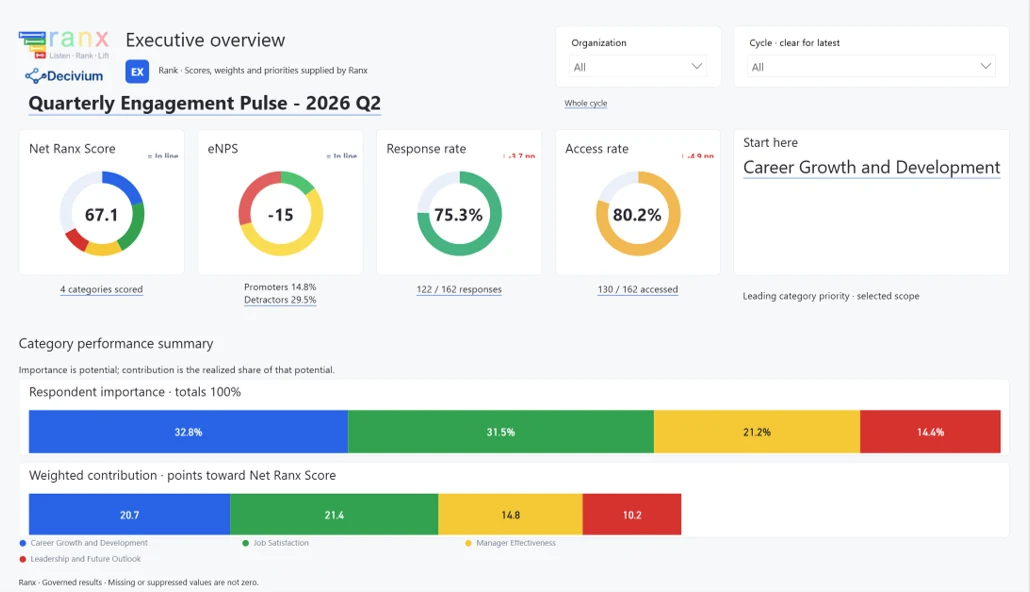
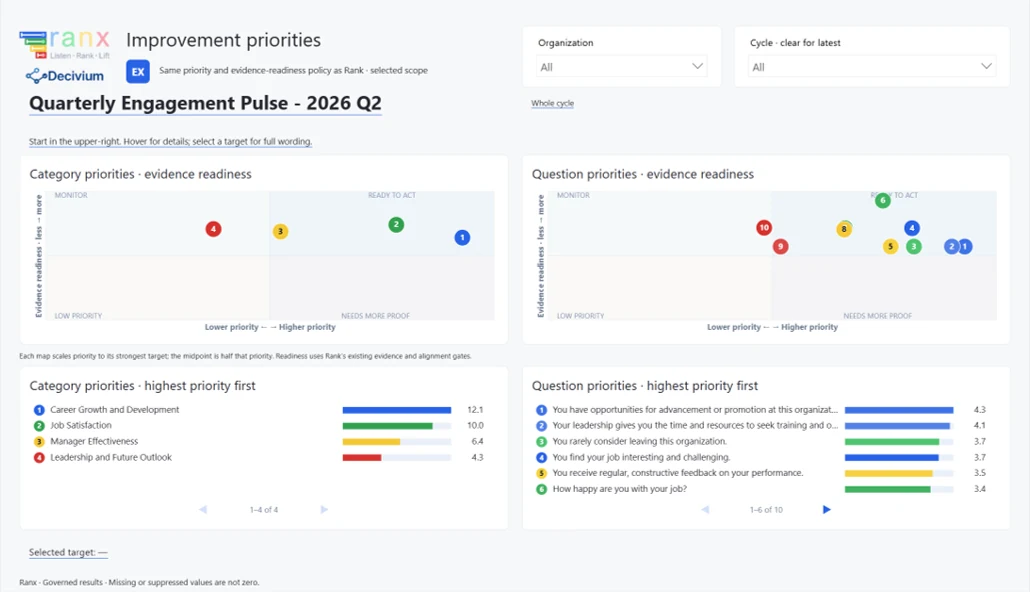
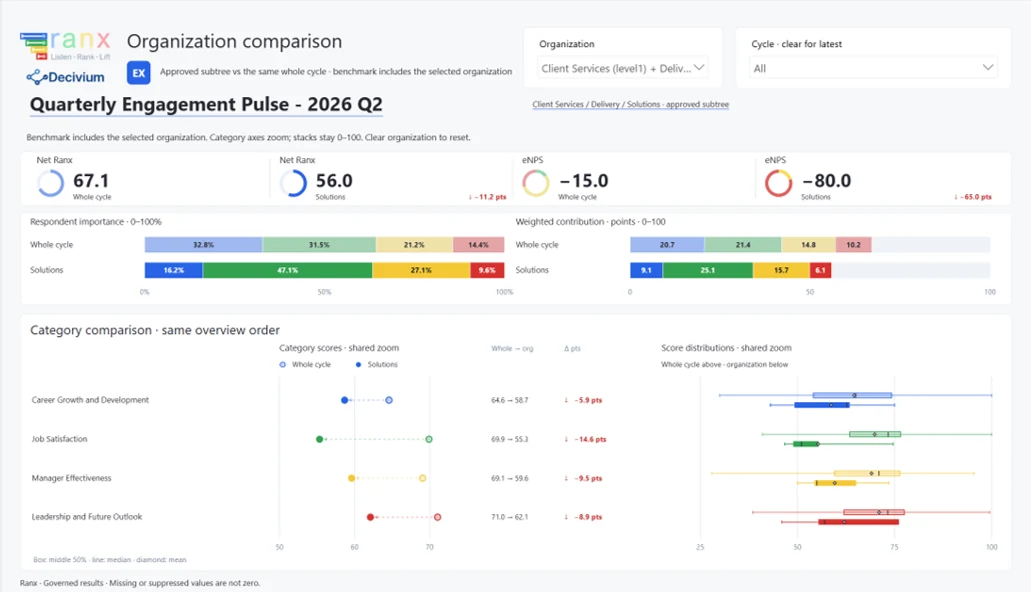
Results API or Power BI pack: raw data, or ready-made reports.

Results API: Included in Pro, Business, and Enterprise. Power BI pack: Included in Business and Enterprise · $99/month add-on on Starter and Pro.

Results APIPower BI pack
What you getResult rows to load into your own systems or data warehouseReady-made report templates: an employee executive pack, plus employee and customer score, NPS, and comment-theme reports
Who it's forData and IT teamsLeaders and analysts who want reports without building them
Is it secure?A read-only key for each connection, shown once and stored scrambled. Access is checked again on every request.A separate sign-in for each survey, which can't reach the API
PrivacyEmployee surveys below your minimum group size are blocked. No names, no comment text. Every release is recorded, like an export.
How often it updatesNew results are available each time a survey closes. Your systems can check as often as they need, up to 120 requests a minute.Each refresh brings in newly closed surveys. You set the refresh schedule in Power BI.
SetupSelf-serve: create a connection in the appFive guided steps, set up with Ranx
Decivium's Q2 survey in the Power BI pack. Sample company, made-up data. Select a page to see it full size.

Without either: download results as CSV or Excel files whenever you need them.

Next step

Build the plan that fits.

Choose a plan, turn on what you need, and see your total before you talk to anyone.

An unhandled error has occurred. Reload x